7 Best Affiliate Marketing Plugins for WordPress


If you are running a WordPress blog and want to earn money through affiliate marketing, choosing the best affiliate marketing plugins for WordPress can make a big difference. You have dozens of affiliate links in Google Sheets, updating manually whenever program changes, and half of your readers clicking raw, ugly links, which screams "this person is trying to sell me something."
This is exactly where the affiliate marketing plugin comes to the rescue.
These tools just don't shorten links; they track, manage, cloak, insert, and optimize every affiliate link on your site. Whether you're running an Amazon niche site. SaaS review blog, a WooCommerce store, or a coupon website, there is a plugin to meet your needs.
In this guide, I am going to walk you through the 7 best affiliate marketing plugins for WordPress right now. I will convert what each one does, who it is best for, what it costs, and the honest pros and cons.
Let's get into it.
Best Affiliate Marketing Plugins for WordPress
1. ThirstyAffiliates

Best for: Bloggers who want clean link management without the complexity
ThirstyAffiliates is the most popular link management plugin if you are using WordPress CMS. It does exactly what most bloggers need in affiliate plugins without overwhelming them with useless features.
The core idea is simple: just turn those ugly links into something like yoursite.com/recommends/toolname. It looks clearer, easier to remember, and also protects your affiliate links against hijacking or being stripped by browsers and ad blockers.
What makes it stand out:
ThirstyAffiliate lets you organize all your links from a single WordPress dashboard. You can even organize them into categories, set them to auto-insert into posts based on keywords, and also get an overview of basic click reports. If a merchant changes URL, you update it once, and it will update across your site. How cool is that?
That last feature is totally a game-changer.
Pros:
- Clean, simple interface even for beginners
- Auto-insert links by keyword
- Geolocation redirects
- Works well with most themes and page builders
Cons:
- Advanced reporting is locked behind the Pro version
- Not built for running your own affiliate program
Pricing: The free version is solid for any beginner who wants to get into affiliate marketing. Plans start at around $99/year for one site.
Who should use it: Anyone who has a blog or review site who wants affiliate link management without a developer by their side.
2. Pretty Links

Best for: Bloggers who want branded short links and basic tracking
Pretty Links is Thirsty Affiliates' closest competitor, and the two are often compared instantly. They're similar in many ways; however, Pretty Links is more into link shortening and the branding side of things.
With Pretty Links, you can create short redirects like yoursite.com/go/product or yoursite.com/out/toolname. You can easily track the clicks it gets, where these clicks come from, and whether clicks happen on desktop or mobile.
It's also not limited to affiliate links. A ton of bloggers around use it for shortened links for social media, email newsletters, and internal pages.
What makes it stand out:
Pretty Links has an auto replace feaures thast can scan existing content and automatically link specific keywords to your affiliate URLs. If you have more than 200 blog posts and want to add a special affiliate link throughout, you can do that in the blink of an eye.
Pros:
- Very beginner-friendly setup
- Auto-replace keywords across existing posts
- Good basic click analytics
- Clean branded URLs
Cons:
- Deep analytics require the Pro plan
- Less focused on affiliate-specific features compared to ThirstyAffiliates
- Can slow down large sites if not configured correctly
Pricing: Free plan available. Pro starts at around $99/year.
Who should use it: Bloggers who want a simple link shortener with minimal affiliate tracking. Also great if you share links across multiple platforms, not just your own blog.
3. Lasso
Best for: Serious affiliate bloggers who want beautiful product displays and revenue tracking
Lasso is not a kind of average link cloaker. It is a full affiliate revenue management platform specifically built for content creators who are serious about monetization.
The biggest strength of the tool is its product display boxes. Instead of plain hyperlinks, it allows you to show it in attractive product cards, with images, description, prices, and a call to action button. These look awesome on the page and convert better than raw text links.
But the real strength of Lasso is its affiliate opportunity detection. It scans your content and lets you know you are linking to a product without using an affiliate link, or if there is a better affiliate program available for that product. It's finding the money opportunity for you 24/7, which you might be leaving on the table.
What makes it stand out:
Lasso directly integrates with Amazon, ShareASale, Impact, and many other networks. It also has a browser extension that lets you add affiliate products to your Lasso library while browsing the internet.
Pros:
- Beautiful product display boxes that improve click-through rates
- Revenue tracking across multiple affiliate programs
- Finds missed monetization opportunities automatically
- Clean dashboard with per-link performance data
Cons:
- Expensive compared to alternatives
- Overkill if you are just starting out
- Requires some setup time to connect all your affiliate accounts
Pricing: Start at a nominal price of $39 per month. There is no meaningful free plan.
Who should use it: Established affiliate bloggers who want to maximize their revenue from what they already have.
4. AffiliateWP

Best for: WordPress site owners who want to run their own affiliate program
This one is a completely different genre altogether. AffiliateWP does not help you manage your affiliate links. It helps you to build and run your own affiliate program so that other people promote your products and earn commissions.
If you sell a digital product, a course, or a WooCommerce store, AffiliateWP turns your customers and fans into affiliates. You set the commission, they get an affiliate link, and the rest of the tracking and reporting is done automatically.
What makes it stand out:
AffiliateWP integrates neatly with WooCommerce and Easy Digital Downloads, MemberPress, and several other WordPress platforms. It has a full Affiliate dashboard that affiliates can log in and check their meaningful status, grab the links, and also request payouts.
Pros:
- Native WordPress integration, no third-party software needed
- Works perfectly with WooCommerce and EDD
- Customizable commission structures
- Reliable tracking with fraud detection
Cons:
- Not useful if you do not sell your own products
- Can get expensive as you add more features through add-ons
- Some advanced features require higher-tier plans
Pricing: Starts at $149.50/year for a personal plan.
Who should use it: Course creators, plugin developers, WooCommerce store owners, and anyone who wants to sell their own products and wants a managed affiliate army.
5. EasyAzon

Best for: Amazon Associates who want faster link insertion inside the WordPress editor
EasyAzon has been around for a while now, and one of the best things it does is to add an Amazon affiliate link without leaving WordPress.
Without EasyAzon, your workflow is like opening Amazon, searching for a product, getting your affiliate link, copying it, going back to WordPress, paste it. And you need to do for evry product and every single post.
With EasyAzon, you search Amazon products inside the WordPress editor using a button in the toolbar. You find the product, click it, and the link is inserted instantly with your affiliate tag attached to it.
What makes it stand out:
EasyAzon's best feature is its localization. which means it redirects visitors to the right local Amazon store. A visitor from Germany clicking your link gets sent to Amazon.de instead of Amazon.com, and that in turn improves your chance of commission from non-US traffic.
Pros:
- Huge time saver for Amazon-heavy blogs
- Search and link insertion without leaving WordPress
- International link localization
- Product information boxes with images and buy buttons
Cons:
- Only works for Amazon, nothing else
- The interface feels a bit dated
- Not as actively developed as some newer competitors
Pricing: A one-time purchase costs you around $47 per single site.
Who should use it: Amazon niche site owners and bloggers who write a lot of product reviews and focus on Amazon products.
6. MonsterInsights
Best for: Anyone who wants to track affiliate link clicks inside Google Analytics without touching code
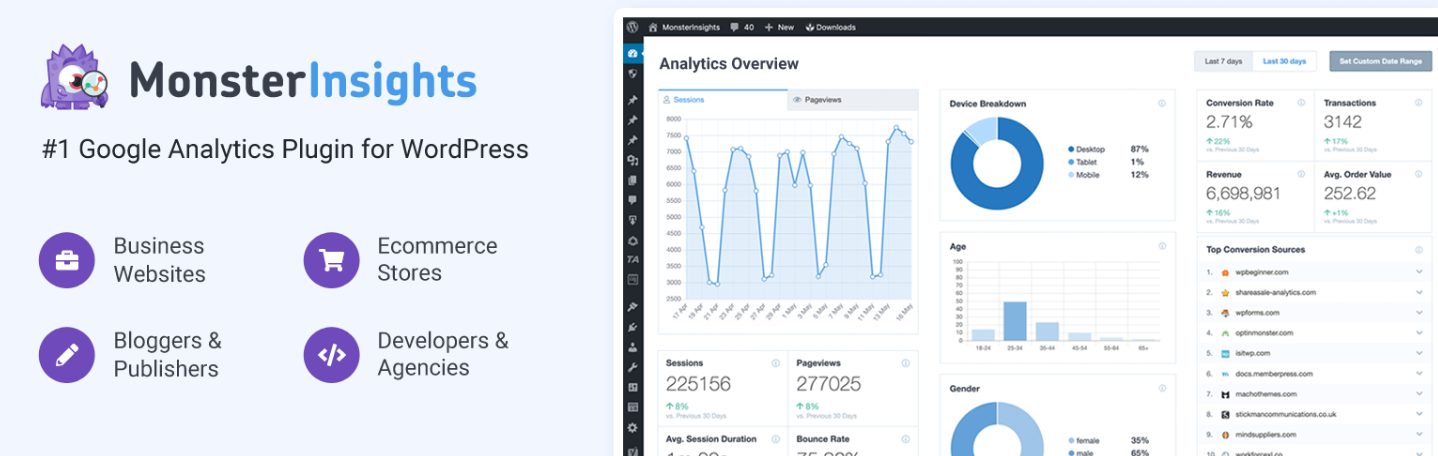
MonsterInsights is basically a Google Analytics plugin, but it's equally fantastic for affiliate marketers because of how well it handles event tracking for outbound ad affiliate links.
By default, Google Analytics does not track clicks happening on your affiliate links. MonstrInsights fixes that issue by automatically setting your event tracking so you can literally check which affiliate links are being clicked on, which pages by which audience segments.
What makes it stand out:
MonsterInsights will show all this data directly inside your WordPress dashboard; you do not need to log in to Google Analytics to check performance. It also tracks the top outbound clicks and generates a well-visualized, detailed report, which gives you glimpses of content driving most affiliate clicks.
Pros:
- No coding required to set up GA4 tracking
- Affiliate link click tracking out of the box
- In-dashboard reports that are actually readable
- Tracks forms, downloads, eCommerce, and media, too
Cons:
- The free version is quite limited for affiliate tracking
- It is a large plugin that adds some page load weight
- You still need a Google Analytics account
Pricing: A free version is available. Plus plans start at $99.50/year.
Who should use it: Any affiliate blogger who wants real data on what's happening. MonsterInsights is not an optional setup that you can ignore. You need to understand what people are clicking.
7. AAWP (Amazon Affiliate WordPress Plugin)

Best for: Amazon affiliates who want professional product displays and comparison tables
AAWP is the top choice, especially for an Amazon affiliate. Where EasyAzon excels in link insertion, AAWP focuses on how those products appear to your readers.
AAWP pulls real-time data from Amazon through the Amazon API. This means you will be double sure that's the price, the current image, and the current availability showing is real. If an Amazon product goes out of stock or changes its price, it will update in real time on your pages. This is a huge deal as this complies with Amazon's terms and also makes your site more trustworthy.
What makes it stand out:
AAWP is capable of showcasing with different display formats: product boxes, comparison tables, bestseller lists, and new release lists. Each display pulls real-time data from Amazon. The comparison table looks aesthetically beautiful for head-to-head product reviews.
| Feature | AAWP | EasyAzon |
|---|---|---|
| Live price updates | Yes | No |
| Comparison tables | Yes | Limited |
| Bestseller lists | Yes | No |
| Works beyond Amazon | No | No |
| Price | From 49 EUR/year | ~$47 one-time |
Pros:
- Always-current prices and product data
- Beautiful product boxes and comparison tables that boost conversions
- Bestseller and new release shortcodes that update automatically
- Compliant with Amazon's display requirements
Cons:
- Only works with Amazon
- Requires Amazon PA API access (you need at least 3 qualifying sales first)
- More expensive than EasyAzon
Pricing: Starts at 49 EUR/year for one site.
Who should use it: Amazon affiliate bloggers who write detailed product reviews, best of lists, and comparison posts. If Amazon is your primary income source, then AAWP is the right solution available right now.
How to Choose the Best Affiliate Marketing Plugins for WordPress
With seven plugins mentioned above, the obvious question is: which one do you actually need?
The honest answer most bloggers need more than one, but they need it for 2 different jobs. Think of it as tools in a toolbox, a hammer and a screwdriver are both useful, but their purpose is different.
Choose Based on Your Goal
If you are an Amazon niche site owner: Your priorities will be product displays, accurate pricing, and fast link insertion. AAWP is the best display plugin available for Amazon. Pair it with MonsterInsights for tracking, and you have the best setup in the world.
If you are a general affiliate blogger: You need link management and cloaking, and serving for this purpose, ThirstyAffiliate is the best choice. If you're earning well and want to add more monetization, go with Lasso.
If you sell your own products: AffiliateWP is the only plugin on this list built for your use case.
If you run a coupon or deal site: Pretty Link is a go-to tool as you are handling a ton of different links across many merchants, and the auto-replace feature in GameChanger.
If you are starting: Start with the free version of TirstyAffiliates or Pretty Links. Do not pay for premium tools if you don't have traffic or revenue.
Important Factors to Consider
- Your primary affiliate network - If you are heavily reliant on Amazon, tools like AAWP or EasyAzon are best for you. If you work with multiple networks, opt for tools like ThirstyAffiliate and Lasso.
- Your technical comfort level - All seven plugins are beginner-friendly; AffiliateWP and Lasso need more setup time. If you need something which srarts running in 10 minutes, start with ThirstyAffiliates or Pretty Links.
- Your budget - The free tiers of ThirstyAffilates and Pretty Links are good to go. Lasso is expensive, so you must invest in it once you have proven revenue. AAWP and AffiiteWP are mid-range and deliver solid value for what they cost.
- Whether you need display boxes or just links - If you want clickable product cards, with images and a buy button, AAWP, Lasso, or EasyAzon, you need to choose. If you just need clean redirect links, ThirstyAffiliates or pretty links serve your purpose.
- Tracking requirements - Every serious affiliate marketer needs Click Data, and MonsterInsights will help you do that within the WordPress dashboard.
Final Verdict
There is no single best affiliate marketing plugin; it totally depends on your use case.
That said, if I had to pick one that gives you the most features, the most value, I would pick ThirstyAffiliates. It handles link management, cloaking, auto insertion, and basic tracking, which is basically needed for any beginner to know what's happening. The free version is genuinely useful, and the pro version is fairly priced without a doubt.
For an Amazon-focused blogger, AAWP wins. The live price update alone makes it the best plugin for Amazon affiliates as it complies with their term and readers will always see correct and accurate information.
For an established blogger who wants to grow faster, Lasso is the most strategic tool on the list. It finds money that you are leaving on the table.
Whatever you choose, the most important thing is that you install and use it consistently. A well-organized affiliate link system, even a simple one, will outperform a messy one with a large margin.
FAQs: Best Affiliate Marketing Plugins for WordPress
Do I need to buy a premium plugin to start affiliate marketing on WordPress?
No. The free versions of ThirstyAffiliates and Pretty Links are more than enough for most bloggers who are just starting. Upgrade once you have consistent traffic and revenue.
Is link cloaking allowed by Amazon Associates?
Yes, link cloaking is allowed as long as you are not misrepresenting the destination. Amazon's terms prohibit deceptive links, but cloaking for cleanliness is within the Amazon terms and completely fine.
Can I use multiple affiliate plugins at the same time?
Yes, and many bloggers do it without any conflict. A common stack you go for is using ThirstyAffiliates for link management while using MonsterInsights for tracking.
What is the difference between ThirstyAffiliates and Pretty Links?
Both plugin well known for cloaking and managing affiliate links. ThirstyAffiliates is more focused on affiliate-specific features like geolocation and category management. Pretty Links is more versatile for general link shortening and branding.
Does AAWP work with the Amazon PA API?
Yes, AAWP requires access to the Amazon Product Advertising API. You need to have an active Amazon Associates account with at least 3 qualifying sales within the first 180 days to maintain API access.
Can AffiliateWP work with WooCommerce?
Absolutely. AffiliateWP was built with WooCommerce in mind and seamlessly integrates natively. It is one of the most popular combinations for ecommerce stores that want to build a referral program.
Is Lasso worth the price for a new blogger?
Not yet. Lasso is more designed to optimize existing affiliate revenue, not for those who have few affiliate earnings. Wait until you are earning at least a few hundred dollars a month before investing in Lasso.
➤ Disclosure: Our content is reader-supported. If you click on certain links, we may make a commission. [Learn More]